Many people have frequently asked “what information is on an MT103?” Well, The MT103 adheres to a standardised format that includes specific information to ensure the validity of the document.
What Information Is on an MT103?
Asking of What Information Is on an MT103, the information includes the sender and recipient’s information, the payment amount, and any additional information or instructions. It’s important that the message is accurate and complete to ensure the payment processes correctly.
Here is the common information included in an MT103:
- Payment reference, which is a unique identifier for the transaction.
- Name, address, and account details of the individual or company sending the money. The sender may be called the remitter or the ordering customer.
- Name, address, and account details of the individual or company receiving the money. The receiver is called the beneficiary.
- The sending bank’s code
- The receiving bank’s code
- Settlement date
- The amount of money being sent
- The currency in which the money is being sent
- The date the transfer was initiated
- The payment route between the banks
- Intermediary bank details (if applicable).
- Details of fees
- Who pays the fee, which can be the sender, the receiver, or a shared arrangement between both.
Example Of MT103 Document
The appearance of an MT103 that the customer gets after the request can vary by bank, but it must include a SWIFT payment message that provides tracking information for the payment destination.
What Information Is on an MT103?
Here’s an example of what an MT103 might look like.
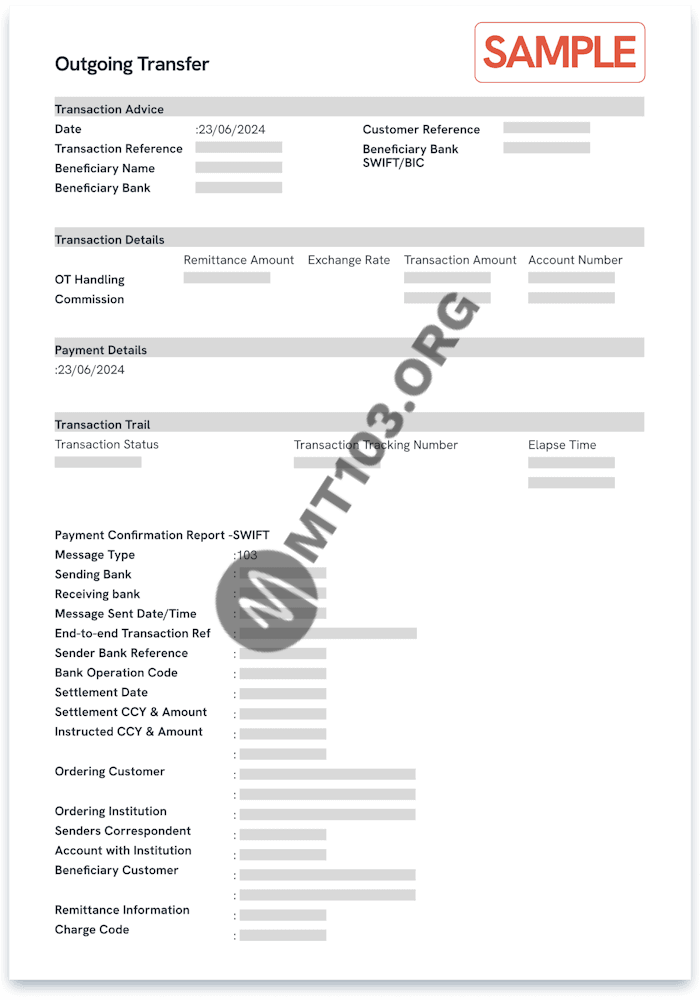
How to Read the MT103
The format of MT103 documents can differ from one bank to another. You might find some MT103 documents straightforward to read, while others use predominantly banking abbreviations.
To help you understand them better, here is a simplified breakdown of the references and abbreviations you may find on MT103 documents.
MT103 Mandatory Tags
- TAG 20: Sender’s reference or transaction reference number, it’s Unique identifier to reference the transaction.
- TAG 23B: Bank operation code, Describes the type of banking operation:
CRED: Standard transfer, most popular and economical option, but the slowest.
SPAY: Transfer via SWIFT Pay Service Level. Faster than CRED but may have additional fees.
SSTD: Transfer via SWIFT Standard Service Level. Balanced speed and cost.
SPRI: Transfer via SWIFT Priority Service Level. Fastest option with the highest fees.
- TAG 32A: Value date/currency/interbank settled amount, Shown as date-currency-amount. For example, 250624USD2000 means a USD 2,000 payment was made on 25 June 2024. The date may differ slightly from your original transfer request due to bank processing times.
- TAG 50A, F or K: ordering customer, The payer’s details, usually the account, identifier code, name, and address.
- TAG 59, 59A or F: beneficiary customer, The payee’s details, usually the account, name, address and identifier code.
- TAG 71A: Details of Charges, This field indicates who will cover the costs of the SWIFT transfer:
BEN: The beneficiary covers all fees.
OUR: The sender covers all fees.
SHA: Fees are shared between the sender and the beneficiary.
Kindly note that tags 50 and 59 may use IBAN format if the accounts involved are in countries that use IBAN, e.g., most of Europe.
MT103 Optional Tags
Optional tags are fields that the sender can choose to add. They offer extra information, but not including them does not hinder the processing of the transaction. These include the followings:
Processing & Instruction Codes
- 13C – Time Indication: Specifies processing times. Example: /SNDTIME/ (debit time at the sender’s bank) or /RNCTIME/ (credit time at the recipient’s bank).
- 23E – Instruction Code: Specifies special processing instructions, such as /CHQB/ (pay by cheque), /CORT/ (corporate trade payment), or /SDVA/ (same-day processing).
Currency & Exchange Details
- 26T – Transaction Type Code: Indicates the purpose (e.g., salary, pension, dividend).
- 33B – Instructed Amount: If included, shows the amount requested by the customer before any conversion or deductions.
- 36 – Exchange Rate: The currency conversion rate applied.
Bank & Intermediary Details
- 51A – Sending Institution: Identifies the sender’s bank.
- 52A – Ordering Institution: If different from the sender’s bank.
- 53A – Sender’s Correspondent: The bank where the sender reimburses the receiver.
- 54A – Receiver’s Correspondent: The bank where the recipient can access funds.
- 55A – Additional Reimbursement Institution: Additional bank involved in processing the transfer.
- 56A – Intermediary Institution: A middle bank that helps process the payment.
- 57A – Account With Institution: The final bank managing the recipient’s account
Tags 52 – 57 primarily use BICs (Business Identifier Codes) to identify the involved banks.
Payment & Fee Breakdown
- 70 – Remittance Information: Notes or reference details for the recipient.
- 71F – Sender’s Charges: Fees deducted by the sender’s bank.
- 71G – Receiver’s Charges: Fees deducted by the recipient’s bank.
- 72 – Sender to Receiver Information: Additional messages between banks.
- 77B – Regulatory Reporting: Compliance codes for banking authorities.
I hope this article “What Information Is on an MT103?” is helpful, to get the mt103 software click here.